Publish and test a MiniTiendAI digital menu
Choose Digital menu when creating the business so its format is correct. Start with AI or a template, then edit dishes and categories in the dashboard. Review ingredients, portions, prices and availability with the person preparing the food; remove any information invented by AI. Publish the link and test its QR code at a table or counter on another phone. Add a drink and a dish to the cart and check the WhatsApp summary. Confirm substitutions, payment and preparation time in the conversation.
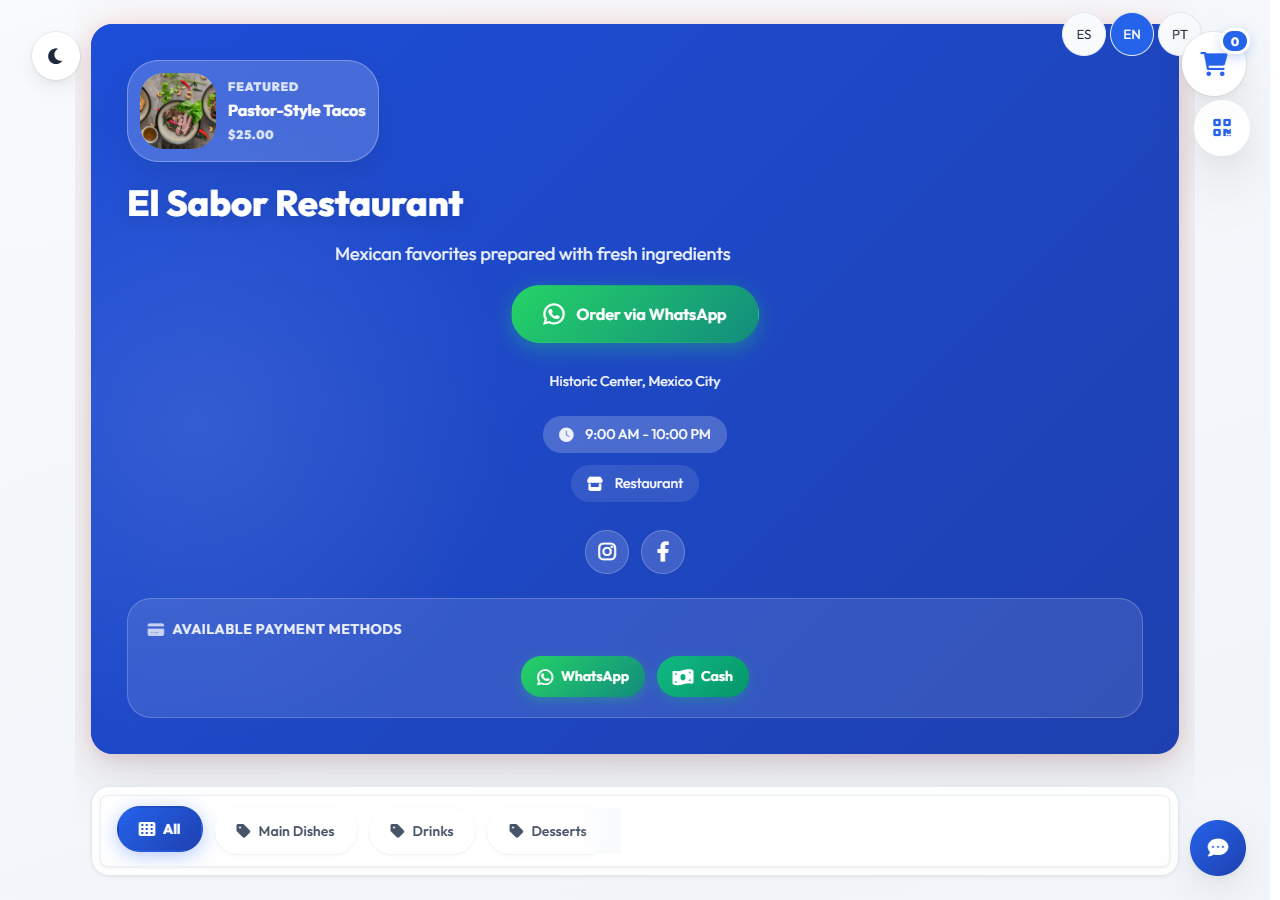
A digital menu should support a decision, not just display items
A digital menu is not a photograph of a printed menu or an endless list of dishes. It is both a sales and an operations tool: it should help customers understand the offer, compare choices, answer basic questions, and submit an order without unnecessary effort. Clear information also reduces messages asking about prices, serving sizes, or ingredients.
Start with the real setting in which people will use it. Many customers will open the link on a phone, with a limited connection, while talking to someone else or choosing a meal in a few minutes. Speed, readable content, and obvious actions matter more than decoration. An impressive animation cannot make up for confusing categories, hidden prices, or a hard-to-find order button.
Organize the menu around the way customers shop
Categories are mental shortcuts. A restaurant might use breakfast, starters, mains, drinks, desserts, and extras; a coffee shop may be clearer with hot drinks, cold drinks, food, and bundles. Avoid creating a separate category for one or two items when that forces customers to jump through too many screens.
Within each category, lead with popular choices, available items, and bundles that are easy to understand. If there is a natural sequence—such as choosing a size, flavor, and side—reflect it in the menu order. Keep naming consistent: if one item says “medium,” do not switch to an unexplained “M” on the next one.
- Keep the main navigation to roughly five to eight categories when practical.
- Separate add-ons and sides from complete products.
- Temporarily hide sold-out items before they reach the order.
- Add search when the catalog is large.
- Use filters only when they genuinely shorten the decision.
Write product details that answer real questions
Every item needs a recognizable name, current price, and short description. State what is included, the size or serving, and the feature that makes it distinct. “Special burger” offers little guidance; “beef burger with cheese, caramelized onions, and fries” helps someone decide. Avoid empty claims such as “amazing” or “the best” when they provide no useful evidence.
Photos should resemble what you actually serve. A bright, well-framed image helps, but a generic picture with different ingredients or portion sizes creates the wrong expectation. Compress images so the page loads quickly and use a consistent aspect ratio. Until you have strong photography, accurate written information is more useful than a misleading image.
- Explain when the price changes by size, option, or add-on.
- Name the main ingredients and available customizations.
- Identify spicy, vegetarian, or otherwise useful product attributes.
- Handle allergen information carefully and follow rules that apply to your business.
- Do not promise permanent availability when stock changes daily.
Design for the mobile experience first
On a small screen, customers should be able to read without zooming, tap without repeated mistakes, and return to a category without losing their selection. Primary controls—categories, cart, and ordering—need plain labels and comfortable touch areas. Floating bars, promotion windows, and the keyboard should not cover important notices or actions.
Test several screen sizes and a slower connection. Check that long titles wrap properly, prices remain visible, and the cart still works when text size is increased. Navigate with a keyboard as well and confirm that focus is visible. Accessibility supports more customers and often exposes interface problems before launch.
Turn the cart into a clear WhatsApp request
WhatsApp can be the confirmation channel without making customers type the entire order again. The cart should prepare a readable message with items, quantities, options, add-ons, notes, and an estimated total. Show a review step before opening the conversation so the customer can remove an item or correct a quantity.
State that sending the message submits a request, and explain when the order becomes confirmed. The restaurant may still need to verify stock, delivery area, delivery fee, and preparation time. This distinction prevents customers from treating a cart submission as payment or automatic acceptance when a staff response is still required.
- Collect a customer name only when it is needed to handle the request.
- Ask for an address and directions inside the private chat, not in public fields.
- Separate subtotal, delivery, and total when those amounts are already known.
- Display service hours before sending customers to WhatsApp.
- Use a business number that the team can monitor consistently.
Keep prices, hours, and availability under control
A useful menu requires ownership. Decide who updates prices, pauses sold-out products, and reviews unanswered messages. If several people handle WhatsApp, agree on how to mark requests as new, confirmed, preparing, dispatched, or canceled. A small restaurant may not need complex software at first, but it does need clear responsibility to prevent duplicate or missed orders.
Publish kitchen hours, delivery areas, accepted payment methods, and important conditions before the customer finishes the request. If a price or delivery fee may change, say so directly. Review time-limited promotions too: an expired offer creates friction and forces staff to resolve an expectation that the menu could have prevented.
Launch a simple version, test it, and improve from evidence
Before sharing the link, place test orders from at least two phones. Ask another person to find a specific dish, choose an option, and reach WhatsApp without coaching. Watch where they pause. That hesitation often points to a confusing label, missing detail, or control that is not visible enough.
After launch, keep track of repeated questions, frequently requested products, and incomplete requests. You do not need to measure every tap to learn. If several people ask whether a bundle includes a drink, add the answer. If messages arrive outside service hours, improve the notice. Small, regular updates keep the menu aligned with actual operations and customer behavior.